

Want to dominate games but stuck with slow clicking? Whether you're grinding Cookie Clicker, battling in Minecraft, or trying to beat your friends in a CPS test, your clicking speed makes all the difference. Most players are stuck at 5-10 CPS while pros hit 20+ easily.
The good news? You can dramatically improve your clicks per second with simple techniques that actually work. From mastering auto click tools to perfecting manual methods, this guide covers everything you need to go from slow clicker to speed demon.
Ready to boost your CPS and start winning? Let's jump in.
Method 1: Master the Big 3 Clicking Techniques for CPS
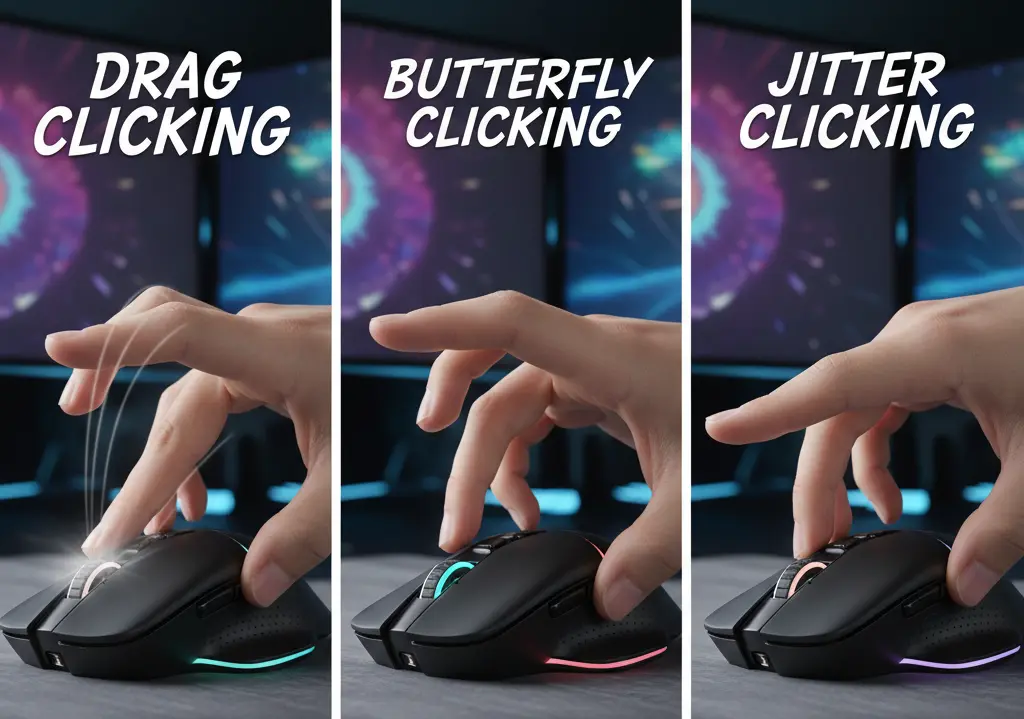
Before diving into other solutions, you need to master manual techniques. These proven methods can take you from 5 CPS to 20+ CPS with practice.
Jitter Clicking - The Beginner's Best Friend
Jitter clicking works by making your hand vibrate while keeping contact with the mouse button. Here's how:
- Rest your finger lightly on the left mouse button
- Lift your wrist slightly off the mouse (don't rest it)
- Tense your arm muscles to create controlled vibrations
- Keep your finger touching the button as your hand "jitters"
Expected Results: 8-15 CPS after a week of practice
Best For: Minecraft PvP, general gaming
Butterfly Clicking - Double the Power
This technique uses two fingers alternating on the same mouse button, like drumming:
- Place both your index and middle fingers over the left click button
- Alternate clicking between fingers rapidly
- Keep a steady rhythm - don't rush at first
- Gradually increase speed as you get comfortable
Expected Results: 15-25 CPS with practice Best For: Games that allow high CPS, competitive clicking
Drag Clicking - The Speed Champion
Drag clicking is the fastest manual method, using friction to register multiple clicks:
- Place your finger flat against the mouse button
- Apply slight downward pressure
- Drag your finger across the button surface quickly
- The friction creates multiple rapid clicks
Expected Results: 25-40+ CPS (requires specific mouse types) Best For: cps test unblocked competitions, speed records
Practice Tips:
- Start with 5-10 minutes daily
- Use a cps test 1 second to track progress
- Don't overstress your fingers - avoid injury
- Try a spacebar cps test to practice with different fingers
Method 2: Get the Right Gaming Mouse
Your mouse can make or break your CPS performance. Here's what actually matters:
Why Gaming Mice Click Faster
Regular mice use cheap switches that can't handle rapid clicking. Gaming mice feature:
- Mechanical switches (not optical) for faster response
- Lower latency between click and registration
- Higher polling rates (500Hz-1000Hz)
- Better build quality for sustained clicking
Top Features to Look For
Mechanical Switches: These register clicks faster than standard switches High Polling Rate: 1000Hz means 1000 updates per second Adjustable DPI: Higher precision for accurate clicking Comfortable Grip: Essential for long gaming sessions
Recommended Options:
- Razer mice (consistently test fastest for CPS)
- Logitech G-series gaming mice
- SteelSeries gaming mice with mechanical switches
Test Your Current Mouse
Before buying a new mouse, check how your current one performs:
Quick CPS Comparison: Try a right click cps test on both your laptop trackpad and external mouse. You'll immediately see why dedicated mice matter - most users see 2-3x improvement just from switching.
Check Mouse Performance: Use a mouse tester to check if your current mouse buttons are working properly. Sometimes what feels like slow clicking is actually missed clicks from worn-out switches.
Polling Rate Check: Test your mouse's actual polling rate to see if it matches the advertised specs. Many cheap mice claim high polling rates but don't deliver.
A good gaming mouse is the foundation of high CPS performance - everything else builds on this.
Method 3: Optimize Your System Settings
Small tweaks can give you significant CPS improvements:
Mouse Settings That Matter
Adjust DPI Settings:
- Higher DPI = more precise cursor control
- Find your sweet spot (usually 800-1600 DPI)
- Too high causes the cursor to jump around
Polling Rate Optimization:
- Set to 1000Hz if available
- Higher polling = faster click registration
- Check your mouse software settings
Windows Optimization
Disable Mouse Acceleration:
- Control Panel → Mouse → Pointer Options
- Uncheck "Enhance pointer precision"
- This makes clicking more predictable
Gaming Mode Setup:
- Enable Windows Game Mode
- Close unnecessary background programs
- Update mouse drivers
- Set the power plan to “High Performance”
Try a mouse cps test before and after these changes - you should see measurable improvement.
Method 4: Use MT Auto Clicker for Maximum Speed
When manual clicking isn't enough, MT Auto Clicker can boost you to 100-1000+ CPS easily.
Why Use Auto Clickers
Sometimes manual clicking just can't keep up:
- Cookie Clicker needs 100+ CPS for optimal farming
- Idle games run faster with consistent clicking
- CPS Test unblocked competitions require extreme speeds
- Your fingers get tired during long gaming sessions
- Some games need sustained clicking for hours
How MT Auto Clicker Works
MT Auto Clicker automates your clicking so you don't have to:
- Set your desired click speed (as fast as 1ms intervals)
- Choose where to click on your screen
- Press a hotkey to start/stop instantly
- Let it run while you do other things
What Makes MT Auto Clicker Special
Ultra-Fast Speed: MT Auto Clicker can click every 1 millisecond - that's 1000 clicks per second! Most other auto clickers can only do 10-50 CPS.
Read: Quick Setup Guide for MT
The 1ms precision is what separates MT Auto Clicker from basic auto clickers - you get professional-level speed that actually works for serious gaming.
Conclusion
Boosting your CPS is simple when you follow the right steps:
Start with manual techniques like jitter clicking and butterfly clicking to reach 15-20 CPS naturally.
Get a good gaming mouse with mechanical switches - it makes a huge difference.
Optimize your settings by disabling mouse acceleration and updating drivers.
Use MT Auto Clicker when you need 100+ CPS for idle games and competitions.
With these 4 methods, you'll go from slow clicking to CPS mastery. Start practicing today and watch your game performance improve!